

Install Replenishment Reminder Pro
Configure opt-in refill sequences, unique coupons, quantity reorder links and click-linked revenue.
Set up replenishment follow-ups with the original quantity and optional incentives. French guide.
Prerequisites and installation
Requires WordPress 6.7+, PHP 7.4+, WooCommerce 10.3+ and JeyTech Replenishment Reminder Free 1.0.1+ active. Use a staging store and a reliable cron for WooCommerce Action Scheduler. Free remains fully functional on its own.
Upload jeytech-replenishment-reminder-pro-1.0.0.zip under Plugins → Add New → Upload Plugin. Your delivery email includes the ZIP, license key and English/French guides. Open WooCommerce → Replenishment Reminder Pro, enter this product's key and select Activate license. Keep Free active alongside Pro.
Solo €59/year for 1 store, Studio €149/year for 5 stores, Agency €299/year for 25 stores. Same features, no order quota. Agency is invitation-only with a card and a 30-day trial, followed by €299/year. Cancel before trial end through My subscription to avoid the annual payment. A license covers this product.
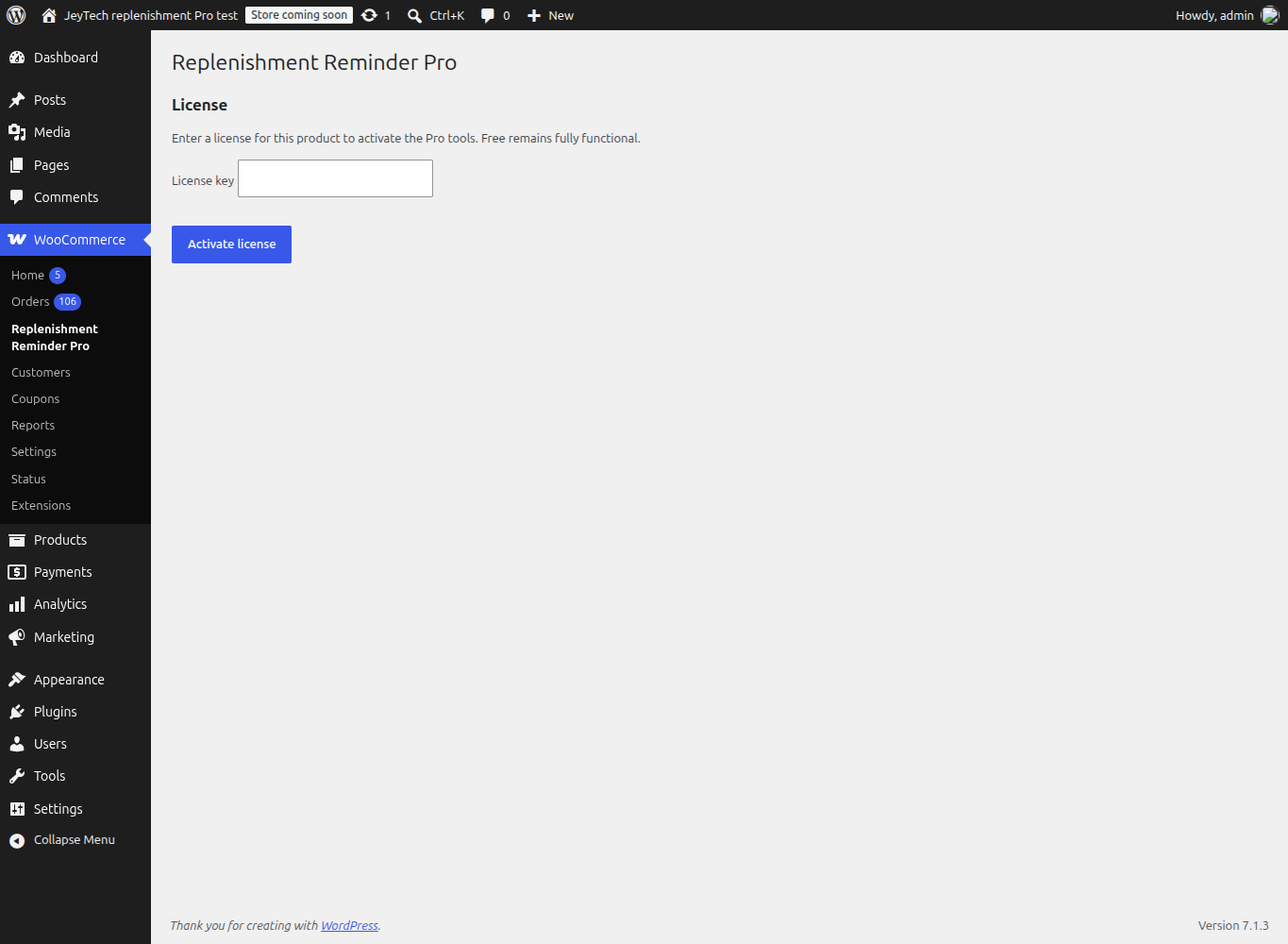
1. Configure Free and explicit consent
In Free, enable reminders, enter consumption days per product or variation, and choose how many days in advance to send its first reminder. A variation can inherit its parent. Quantity multiplies consumption days. The estimate starts when a paid order is completed.
Customers must tick the optional checkbox at classic checkout or Checkout Blocks. Nothing is preselected; an account, historical purchase or imported address is insufficient. Every email includes the Free unsubscribe link. A later purchase with fresh explicit consent can restart reminders. Refunded lines, changed recipients, unavailable products and later paid repurchases are checked before sending.
2. Add up to two Pro steps
Enable Enable Pro steps for new orders. Default offsets 0,5 mean the estimated depletion date and five days later. Two distinct integer offsets from -30 to 30 are accepted; blank disables additional steps. The earliest send is one day after completion. An extra step falling on the Free reminder day is omitted.
Example: 30 days per unit × 2 units gives depletion at day 60. With Free advance 3 and Pro offsets 0,5, reminders fall at day 57 (Free), day 60 and day 65 (Pro). Free's original reminder remains plain text with its original one-unit link. Pro emails use HTML and the original quantity.
Only new consented checkouts while Pro is activated and enabled enroll. No historical backfill occurs. Pro settings are frozen per line at completion, so later template/timing edits affect newly scheduled sequences. Turning off Pro steps also stops pending Pro sends; re-enabling does not retry skipped or uncertain attempts. A failed mail attempt is not retried automatically. Check WooCommerce → Status → Scheduled Actions and your mail transport when diagnosing delivery.
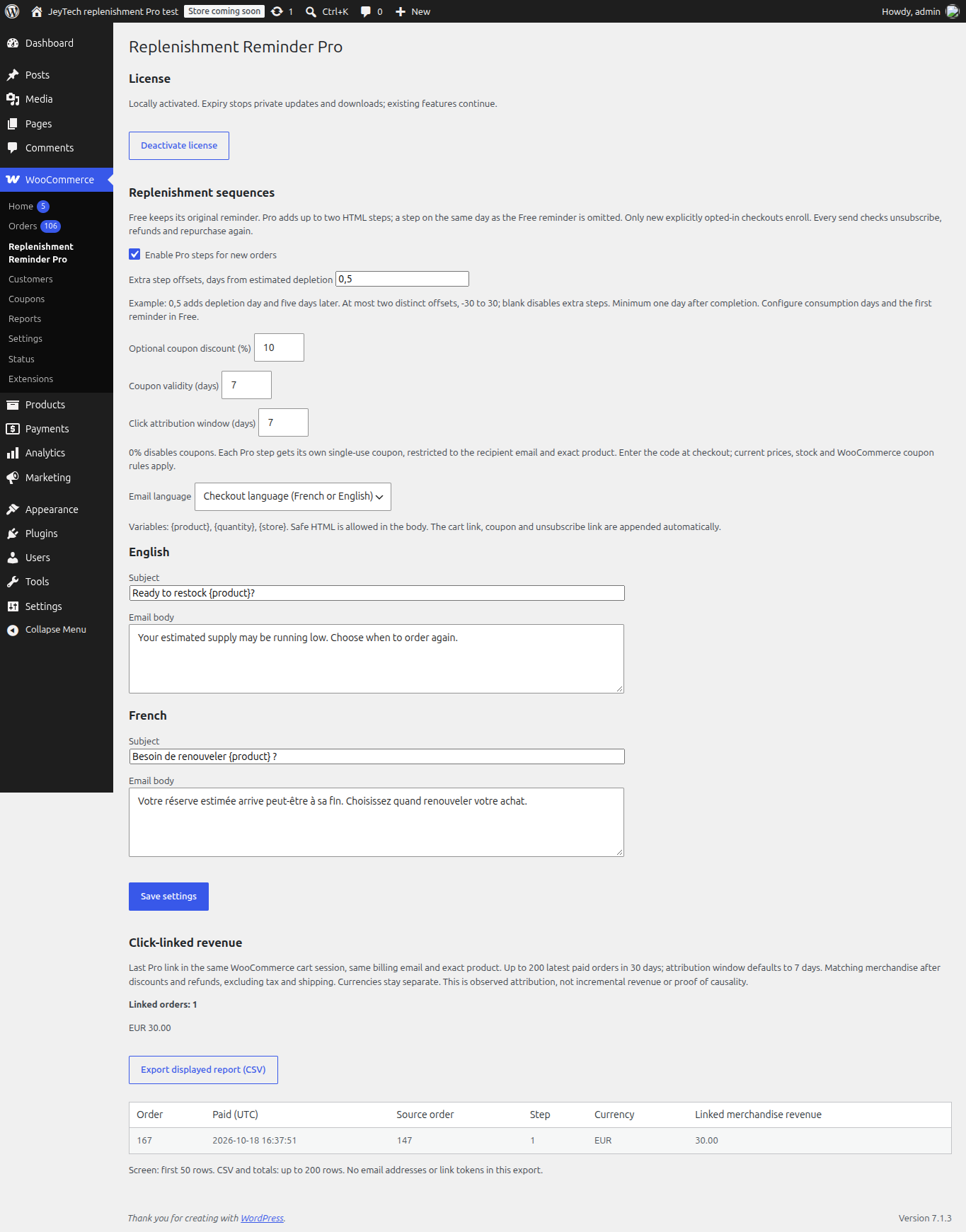
3. Customize English and French HTML emails
Choose checkout language (French when the checkout locale starts with fr, otherwise English), or force English/French. Edit both subjects and bodies, using {product}, {quantity}, {store}. Safe HTML is accepted in bodies; subjects are plain text. Limits: 200 bytes per subject, 5000 per body. The native WooCommerce mail wrapper, cart link and unsubscribe link are added automatically.
WordPress user/site language controls the Pro administration and bundled French catalog. Custom merchant text is kept as entered. Free's WordPress.org language pack is separate and subject to community validation.
4. Optional single-use coupons and prepared cart
Discount 0% disables coupons. Choose 1–50% and validity 1–30 days. With WooCommerce coupons enabled, each attempted Pro step creates its own native coupon, restricted to the billing email and exact product/variation, single use and individual use. The buyer enters the displayed code at checkout. Discounts reduce your margin; WooCommerce remains responsible for final coupon validation.
The Pro link adds the original line quantity and variation to the current cart using current prices and availability. It leaves other cart items present; stock and purchasing limits may prevent the addition. Reopening the same step in the same session does not add the quantity again. A link is available for 90 days after its accepted send. It never logs the buyer into an account, creates an order or charges a payment.
5. Read observed attribution and export
A valid Pro link records the last source in the native WooCommerce cart session. A paid order is linked only within the configured 1–30 day click window (default 7), for the same billing email and exact product. This measures matching merchandise after discounts and line refunds, excluding taxes and shipping. It is observed attribution, not proof that the reminder caused a sale.
The report considers at most the 200 latest paid orders within 30 days carrying a Pro source. The screen shows its first 50 rows; totals and CSV use up to 200. Currencies remain separate. Export displayed report (CSV) contains order/source IDs, paid date, step, currency and amount; no email addresses or bearer tokens. Filters, changed sessions and the row cap can omit orders. It is not an accounting archive. No tracking pixel is added.
6. Updates, expiry, moving a license and support
Activation sends the key and store URL to jeytech.app; private update checks send product, activation ID, token and installed version. No license service request is made during checkout. Expiry stops private downloads, new activations and updates while existing locally activated functions continue. Renewal restores access subject to the service status.
Use Deactivate license on the old site before activating another store. Failed remote deactivation keeps the local activation so you can retry; successful deactivation retains settings and order metadata and leaves Free running. Disabling the Pro plugin unschedules Pro tasks; reactivation does not backfill earlier orders. Previously issued coupons remain native WooCommerce coupons until used or expired.
If the menu is missing, check dependency versions. If there are no Pro tasks, check license activation, both enable switches, explicit checkout consent, product days and completion/payment. If a customer receives no mail, check opt-out, repurchase, refunds, availability, Action Scheduler and the mail provider; accepted transport does not guarantee inbox delivery. Test both classic checkout and Blocks on staging, including a variation, unsubscribe and repurchase.
My subscription handles subscription/download recovery. Contact or support@jeytech.app provides support. Purchase download links follow the existing seven-day policy.
