

Stop coupons from selling below cost in WooCommerce
Set a WooCommerce coupon minimum margin with native product costs, start in observation and test blocking in classic checkout and Checkout Blocks.
To prevent selling below cost in WooCommerce, check what each product line earns after discounts, rather than relying on the basket total. A profitable item or paid shipping can hide a loss on another line. JeyTech Below Cost Guard Free compares final product revenue excluding tax with native WooCommerce costs and an optional minimum product margin.
Start in observation mode. It records findings while allowing payment. Blocking comes after you have verified product costs and representative coupon combinations.
What the margin floor covers
Free reads native Cost of Goods Sold (COGS), handles simple products and variations, and checks native percentage, fixed-product and fixed-cart coupons after WooCommerce allocates them. Stacked native coupons are checked through their final totals. The guard does not reduce a coupon or raise a price to make a basket pass.
WooCommerce’s coupon restrictions include minimum spend and product exclusions. Those controls do not calculate this per-line cost-and-margin floor. See the native COGS documentation for enabling costs and assigning product or variation values.
1. Enable native costs and populate the catalog
On a test store, install Free 1.0.0 with WordPress 6.7+, WooCommerce 10.3+ and PHP 7.4+. Open WooCommerce → Settings → Advanced → Features, enable Cost of Goods Sold and save changes.
Edit a simple product under Products → All Products → Product data → General. Set its native Cost of Goods to a positive unit cost excluding tax, for example €80. Save it. A variable product can provide a default cost on its parent and overrides on individual variations. Check the effective cost of each variation you sell.
The plugin does not read arbitrary cost fields from third-party extensions. A missing or zero cost is a coverage problem, including for a product you intentionally give away at zero acquisition cost.
Expected result: every product used in the test has a positive, usable native cost in the store currency.
2. Observe before blocking
Open WooCommerce → Settings → Advanced → Below Cost Guard. Keep Mode → Observe and log, the default, and set Minimum product margin (%) to 20 for this example. Save changes.
Margin is a share of revenue, not a markup on cost:
required product revenue excluding tax = unit cost × quantity ÷ (1 − margin / 100)
An €80 cost with a 20% margin needs €100 after discounts, excluding tax for one unit. At 0%, the floor is product cost. The percentage can range from 0 to 99.
Submit a test checkout whose discounted product line is €99 excluding tax. Open WooCommerce → Status → Logs and select source jeytech-below-cost-guard. Inspect the product IDs, mode and diagnostics.
Expected result: observation records the €99 line below its €100 floor and permits payment through your test method.
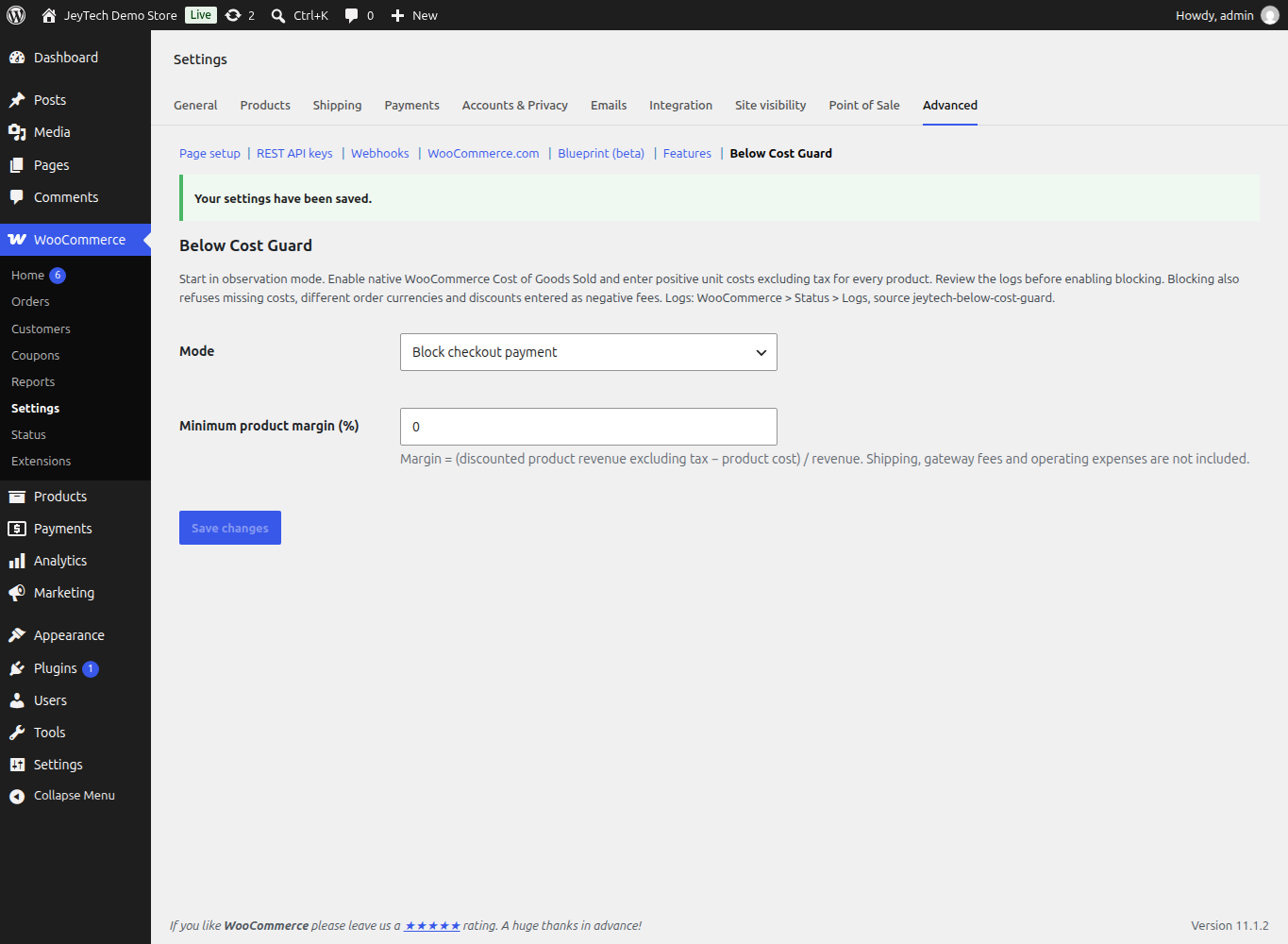
This capture already shows blocking and a 0% margin. Use Observe and log and 20% for the observation example.
3. Test the boundary in classic checkout and Blocks
On the test store, select Mode → Block checkout payment and save. Use a test payment method and submit both a classic checkout and Checkout Blocks checkout. Set up product prices and native coupons so the final product-line total excluding tax, rather than the basket total, matches these cases:
| Cost and margin | Final line revenue | Expected guard result |
|---|---|---|
| €80, 20%, quantity 1 | €100 | Passes this floor. |
| €80, 20%, quantity 1 | €99.99 | Payment refused. |
| €80, 20%, quantity 2 | €200 | Passes this floor. |
| Missing or zero cost | Any amount | Payment refused. |
Repeat with fixed-product, percentage and fixed-cart coupons, then a permitted combination of coupons. Include a second profitable item: it must not offset a losing first line. Other WooCommerce checks may still reject a cart that passes the margin floor.
The server validates cart totals and checks the final order before standard payment processing. Customers receive a neutral error without your costs or margins. Temporary stock and coupon holds are released when an unpaid order is rejected at the final check; an unpaid order may remain for review and retry. The plugin does not automatically cancel it or refund paid orders.
Expected result: both checkout types refuse below-floor payment; passing totals proceed subject to normal checkout validation.
4. Check strict refusals and your actual checkout
In observation, review all findings before enabling blocking on the live store. Blocking also refuses disabled COGS, an order currency different from the store currency, and discounts represented as negative fees that cannot be allocated to product lines. Fix those causes and repeat the relevant test before changing the live mode.
Check your own theme, gateways and promotion extensions on staging. Standard order-pay validation is included, but custom charges or changes made after the supported payment hooks need separate validation. Bundles, subscriptions, deposits, third-party cost fields and currency conversion have no general compatibility promise.
Expected result: legitimate products can pass, unsupported or unknown costs are understood, and the actual checkout is tested before live blocking.
What Pro adds
Below Cost Guard Pro adds product/variation and category margin rules, a fixed extra cost reserve per sold unit, and a bounded merchant audit journal with CSV export. It keeps the Free global margin as a minimum; a lower Pro rule cannot weaken it. The reserve is an estimate, not a reading of actual payment or shipping costs.
Keep Free active and use the Below Cost Guard Pro installation guide for rule priority, reserve examples and journal limits.
A product floor is not a profit or legal guarantee
Shipping income and positive fees do not offset a losing product. Actual shipping costs, gateway fees, advertising, overhead and refunds are not reconciled by Free.
In France, the legal resale-at-loss threshold uses an effective purchase price with statutory adjustments and exceptions. A native COGS value is not automatically that legal threshold. This plugin does not certify compliance with Code de commerce, Article L442-5.
Read next: Show the price per kg or litre for customer-facing quantity comparisons, or audit promotion reference prices for a different pricing check.