

Install Below Cost Guard Pro
Add product and category margin floors, a cost reserve and a merchant audit journal to WooCommerce native costs.
Install margin rules, a cost reserve and the merchant journal. French guide.
Prerequisites and installation
WordPress 6.7+, PHP 7.4+, WooCommerce 10.3+, JeyTech Below Cost Guard Free 1.0.0+, native WooCommerce Cost of Goods Sold enabled, usable positive costs and permission to manage WooCommerce. Free remains active and fully functional without Pro.
Install jeytech-below-cost-guard-pro-1.0.0.zip through Plugins → Add New → Upload Plugin alongside Free. The delivery email supplies the key, ZIP and both guides. Open WooCommerce → Below Cost Guard Pro and choose Activate license with a key for this product.
Annual subscriptions: Solo €59 / 1 store, Studio €149 / 5 stores, Agency €299 / 25 stores. Same features, no order quota. Agency is available by invitation: 30 days with a required card, then €299/year. Cancel via My subscription before trial end to avoid billing.
1. Start with observation in Free
Free controls the mode and global margin in its WooCommerce settings. Observation is its default: findings are logged while checkout continues. Enforcement blocks an unsafe checkout before payment. Start in observation, verify native costs and run test orders before switching to enforcement.
Pro never removes Free's callbacks. An explicit Pro rule below Free's global margin cannot lower the Free minimum. Missing/zero costs, disabled native COGS, unsupported transaction currencies and unallocated negative fees retain Free's strict refusal in enforcement. Neither plugin guarantees net profit.
2. Add product and category margins
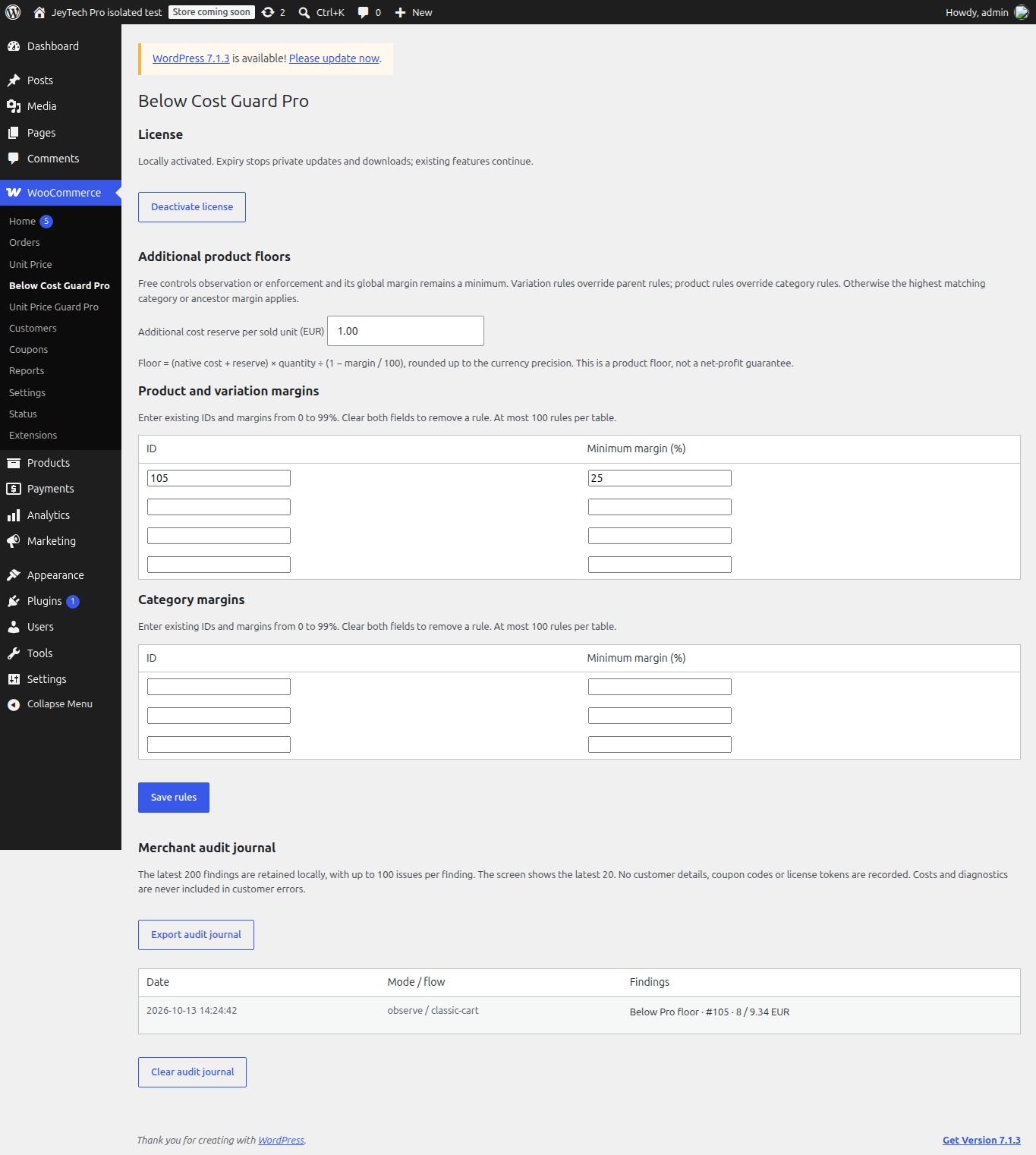
In Pro, enter existing product/variation IDs or product category IDs, with margins from 0 to 99%. Margins are a share of product revenue, not a markup on cost. You can locate IDs in the native product/category screens.
Priority: explicit variation, then parent product, then highest matching category or ancestor margin. A product rule takes priority over a category rule, but Free's global minimum always applies. Clear both fields to remove a row, then Save rules. Saving adds three empty rows, up to 100 rules per table. Invalid IDs, duplicate IDs or invalid values keep the whole previous configuration.
Example: native cost €60, margin 40%, quantity one requires €100 of product revenue after discounts and excluding tax. €99 is rejected in enforcement. A global Free margin of 45% remains stricter even if the product's Pro rule is 40%.
3. Add a cost reserve
Additional cost reserve per sold unit is a fixed amount in the store currency, from 0 to 1,000,000. It applies to every sold unit, not once per order. It may represent an estimated handling cost; it does not read real gateway or carrier fees.
The floor is (native cost + reserve) × quantity ÷ (1 − margin / 100), rounded up to currency precision. Cost €60, reserve €2.50 and margin 25% requires €83.34 for one unit, €166.67 for two. A changed store currency with a nonzero saved reserve creates a finding and refuses payment in enforcement until you review and save the reserve in the new currency. No automatic conversion is performed.
4. Read the merchant journal
The journal keeps the latest 200 findings, up to 100 issues per finding; the screen shows the latest 20. Each entry records time, mode, flow, product ID and available revenue/floor diagnostics. It stores no customer details, coupon codes or license tokens. Export audit journal exports the retained entries; Clear audit journal deletes them without changing rules.
This is a bounded operational journal, not an accounting archive or guaranteed event ledger. Concurrent requests can replace a recent entry; export evidence you need to keep. Generic customer errors reveal no costs or thresholds.
5. Verify checkout before enforcement
On staging, use a test payment method and test classic checkout and Checkout Blocks. Try a total at the floor, one minor currency unit below it, stacked coupons, a product variation and an unknown cost. Observation should record findings and permit checkout; enforcement should reject unsafe payment. Repeat after changing product costs, categories or the store currency. The final order checks also cover late changes before payment and native order-pay.
Pro does not alter prices or reduce coupons to fit the floor. Native stock/coupon holds of a rejected unpaid order are released. It does not reconcile shipping costs, taxes, refunds, advertising expenses or third-party cost systems. Custom checkout/payment extensions must be tested separately.
6. Language, updates, expiry and moving a license
English source strings and bundled French catalogs follow the WordPress site/user language. Changing language keeps rule IDs and amounts. Free's community language pack remains separate.
Activation sends the key and site URL to jeytech.app; update checks send activation ID, token and version. No license network calls run during checkout. Expiry stops new activations, private downloads and updates while locally activated rules continue. Use Deactivate license on the old store before activating elsewhere; a failed remote release preserves local activation. Deactivation returns to Free checks and retains rules/journal; disabling the Pro plugin retains data too.
If the menu is missing, verify active dependencies and versions. If all checkouts are rejected, inspect Free mode, native costs, currency, negative fees and the merchant journal. Test valid and invalid saves before using enforcement.
My subscription provides subscription and download recovery; Contact or support@jeytech.app provides support. Purchase download links follow the existing seven-day policy.
Agency trial by invitation
A personal invitation gives you a 30-day free trial for 25 stores of this product. Open the invitation, select the Agency trial, accept the terms and complete Stripe Checkout with a payment card. The license email provides the key, ZIP link and trial end date. Follow the installation steps below.
Unless you cancel before the trial ends, €299 per year is charged automatically. To cancel, request the portal link from My subscription with the invitation email address, then cancel in Stripe. Access remains available until the trial ends. New activations, downloads and updates stop afterward unless the subscription renews. Keep your personal invitation link private.
Follow the Free coupon margin test to check observation and both checkout types before enabling blocking.