

Install Unit Price Guard Pro
Import net quantities, audit your catalog and keep purchased unit prices in WooCommerce orders and emails.
Install the add-on, import net quantities and review purchased unit prices in new orders. See the French guide.
Prerequisites and installation
WordPress 6.6+, PHP 7.4+, WooCommerce 9.6+, JeyTech Unit Price Guard Free 1.0.0+, and permission to manage WooCommerce. Keep WooCommerce and Free active. Free still displays unit prices on products, variations, catalog, cart and checkout without a Pro key.
The purchase email provides the key, download and both guides. Install jeytech-unit-price-guard-pro-1.0.0.zip through Plugins → Add New → Upload Plugin. Open WooCommerce → Unit Price Guard Pro, enter a key for this product and choose Activate license. A key for another JeyTech product cannot activate it.
Annual subscriptions: Solo €59 / 1 store, Studio €149 / 5 stores, Agency €299 / 25 stores, with the same features and no order quota. Agency applies to this product. An Agency invitation offers 30 days with a required card. The trial starts at Stripe confirmation, delivers the license immediately and renews at €299/year. Cancel through My subscription before the end to avoid billing.
Agency trial by invitation
A personal invitation gives you a 30-day free trial for 25 stores of this product. Open the invitation, select the Agency trial, accept the terms and complete Stripe Checkout with a payment card. The license email provides the key, ZIP link and trial end date. Follow the installation steps below.
Unless you cancel before the trial ends, €299 per year is charged automatically. To cancel, request the portal link from My subscription with the invitation email address, then cancel in Stripe. Access remains available until the trial ends. New activations, downloads and updates stop afterward unless the subscription renews. Keep your personal invitation link private.
1. Import and export net quantities
Use Products → Import with the native WooCommerce importer and select Update existing products when updating a catalog. Back up/export the products first. Identify each product or variation by its ID or SKU. Map these columns:
| CSV column | Example | Meaning |
|---|---|---|
jeytech_upg_quantity |
250 |
Net quantity in one sold product |
jeytech_upg_unit |
g |
g, kg, ml, cl, l, cm, m or m2 |
jeytech_upg_reference |
blank or 100 |
Default reference or per 100 g / 100 ml |
For coffee at €10 per 250 g, use 250,g, to display €40/kg. Reference 100 gives €4/100 g. Decimal commas are accepted in quoted CSV cells. Reference 100 is reserved for mass and volume. Invalid rows fail before the product is saved; the previous product name and quantity remain. Other valid rows in the same file can still import: this is not an all-file transaction.
A mapped blank quantity explicitly clears all three fields on that product. A variation with no own quantity inherits its parent's Free data. Omitted columns keep existing values. A blank unit with a positive quantity fails. Use Products → Export to obtain the same fields, then verify a small batch before importing the whole catalog. Free's product editor remains available.
2. Audit catalog coverage
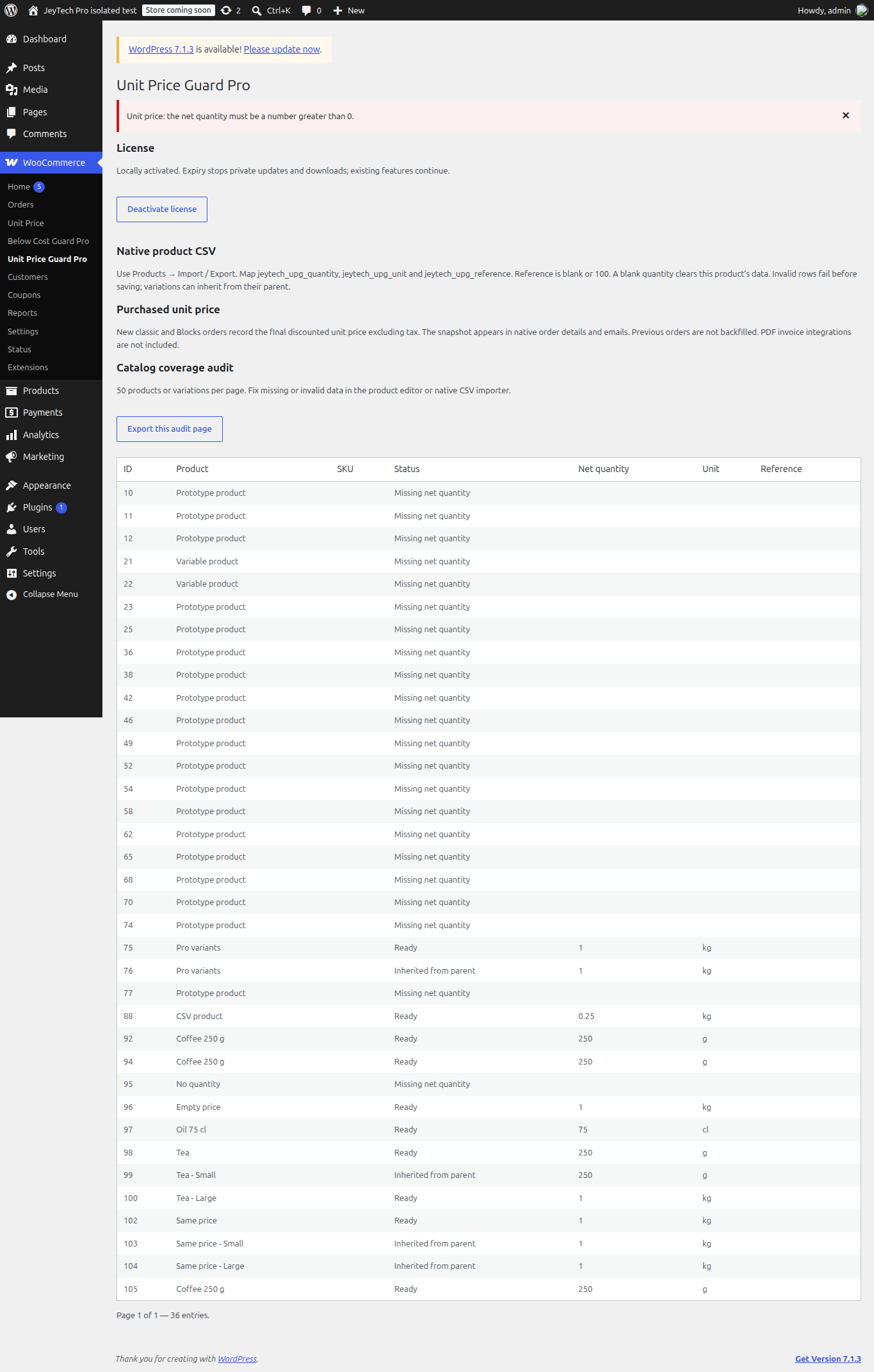
The Pro screen lists 50 products or variations per page, with their ID, name, SKU, effective quantity and status: Ready, Inherited from parent, Missing net quantity or Invalid saved data. Use Next page and Previous page to review the catalog. Export this audit page exports that page, not the whole store.
Fix missing or invalid data in the product editor or native CSV importer. An invalid variation may use Free's parent fallback; the audit still flags its own malformed data for correction. This audit is not a legal-compliance certification.
3. Keep the purchased unit price
New classic and Blocks checkouts record the final product-line price after native coupon discounts, excluding tax, divided by the purchased net quantity. A hidden order-item snapshot stores the amount, reference, currency and net data. Native order details and HTML/plain-text order emails show Purchased unit price (excl. tax).
For two 250 g products at €10 each with a 20% coupon, the product-line total is €16 and the snapshot is €32/kg. Later edits to the catalog do not rewrite it. Old orders are not backfilled. Fees, shipping and refunds are not allocated into this figure. It does not replace the current unit price shown by Free in the cart. No specific PDF invoice connector is included; a PDF template that suppresses native hooks needs its own integration.
4. Language, license and updates
English is the source language. French is bundled in this private ZIP. Choose the site or user language under WordPress settings/profile. Switching language does not rewrite saved quantities or order snapshots. Free's community translation is a separate WordPress.org language pack.
Activation sends the key and site URL to jeytech.app; private update checks send the activation ID, token and current version. These calls occur for licensing/updates, not per checkout. Existing locally activated tools continue after subscription expiry; new activations, downloads and private updates stop. Deactivate license first when moving a license to another store, then activate there. If remote deactivation fails, the local activation is retained so the slot is not falsely reported released.
Settings, product data and existing snapshots are retained on local license deactivation or plugin replacement. With the add-on active, old snapshots remain readable after local license deactivation; disabling the plugin removes its rendering hook but retains the stored metadata. Keep a backup before updates.
Troubleshooting
An absent Pro menu usually means WooCommerce or Free is inactive or below its minimum version. Invalid CSV data is reported by the native importer. A missing snapshot usually means the item had no usable net data, was purchased before activation, or was created through a flow outside standard classic/Blocks checkout. Test both checkout types on staging with a test payment method and verify the order and its captured email.
Use My subscription for download recovery and the subscription portal, or Contact / support@jeytech.app for help. Purchase links follow the existing seven-day delivery policy.
Start with the Free price per kg/litre setup before importing quantities or reviewing order snapshots. For consumables, you can also set optional replenishment reminders based on purchased quantity.