

Why WooCommerce Hold stock doesn't cancel on-hold bank transfer orders
Understand Pending payment and On hold, check incoming transfers, and preview automatic cancellation of unpaid BACS orders.
WooCommerce’s Hold stock (minutes) setting does not automatically cancel On hold bank transfer orders. This guide explains why, shows the manual WooCommerce workflow and helps you decide whether JeyTech Unpaid Transfer Guard Free fits your unpaid orders.
What you need
Use an administrator account, access to the merchant’s bank statement and a test store before enabling automatic cancellation. Identify the payment method and actual status of each order first.
1. Distinguish Pending payment from On hold
| Status | What it means here | Native Hold stock cancellation |
|---|---|---|
Pending payment (pending) |
Payment has not been completed. | Can apply to eligible checkout orders when stock management and a positive hold duration are enabled. |
On hold (on-hold) |
The order awaits payment verification, as with a normal positive-total BACS order. | This status is outside the native unpaid-order query. |
Open WooCommerce → Settings → Products → Inventory to find Hold stock (minutes). Increasing that duration will not make the native task include On hold orders.
In WooCommerce 11.1.2, the native cancellation function retrieves old Pending payment orders. Both classic storage and HPOS storage select that status. The BACS gateway normally puts positive-total orders On hold. Extensions can alter the default behaviour.
Expected result: you can tell a bank transfer awaiting verification from a Pending payment order. A BACS order still On hold after the hold duration is consistent with this native behaviour.
2. Handle the order manually in WooCommerce
Open WooCommerce → Orders, then the bank transfer order. Compare the incoming bank transaction’s amount and reference with the order before deciding what to do.
- If funds have arrived, record the verification and move the order to Processing when fulfillment remains to be done, or Completed when it is fulfilled.
- If funds have not arrived, keep it On hold while the agreed payment period remains open. After that period, cancel it according to your store’s terms, or agree an extension with the customer.
WooCommerce’s bank transfer instructions require the merchant to verify payment. WooCommerce does not check your bank account through BACS. With stock management enabled, cancellation normally restores stock previously reduced for that order; verify this on your test product.
Expected result: the status follows the verified payment and fulfillment, with an order note explaining the decision.
3. Preview a separate bank transfer deadline with Free
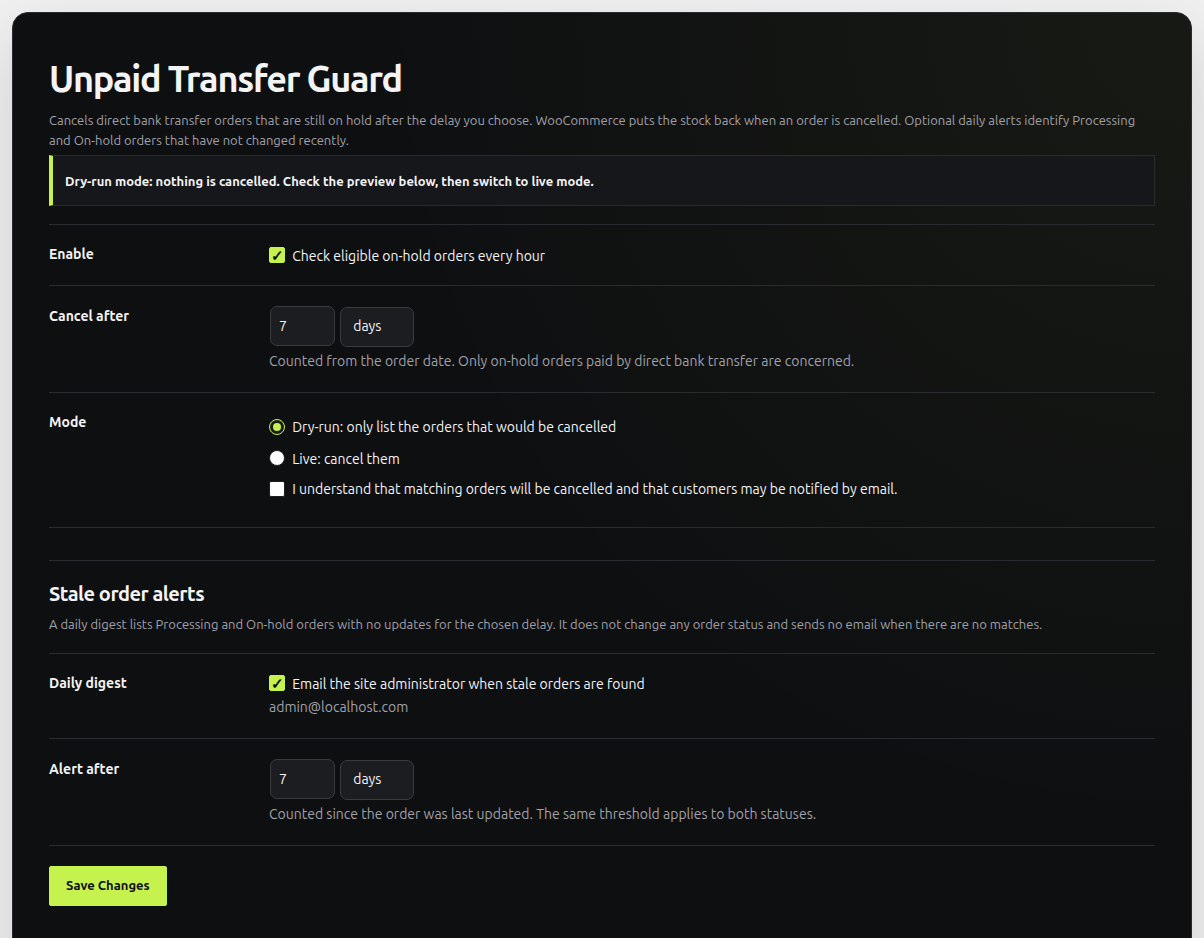
For recurring unpaid BACS orders, install Unpaid Transfer Guard Free. Open WooCommerce → Unpaid orders. Start with Dry-run and a payment delay suited to your bank and terms, for example 7 days.
Free handles BACS orders still On hold, without a recorded payment date. The base deadline runs from the order creation date, not from the moment you last changed its status. Order-total rules and manual extensions can change the effective deadline. Inspect it before enabling real cancellations.
Dry-run lists eligible orders and cancels nothing. It also sends no Pro reminders. Check your bank and update orders whose payment has arrived before relying on the preview: the plugin reads WooCommerce’s records, not the bank.
Expected result: the preview contains only orders you would actually cancel under the saved rules. For the settings and deadline walkthrough, follow the full unpaid bank transfer setup.
4. Enable cancellation only after reviewing the preview
Once the payment records and deadlines are correct, switch to Live and tick the confirmation for real cancellations. Keep the plugin enabled. Its Action Scheduler task runs hourly and checks status, payment date, method and effective deadline again before cancelling.
This is not a promise to cancel at the exact deadline. Scheduled-task delays, workload and any Pro reminder grace can postpone processing. Check the order note and WooCommerce → Status → Logs after a test cancellation, as well as the product’s stock.
Expected result: an eligible unpaid BACS order is cancelled after its effective deadline when the task processes it. Paid orders must already be recorded correctly in WooCommerce.
Optional Pro features
Unpaid Transfer Guard Pro adds per-payment-method delays, reminders before cancellation and exclusions by customer ID, billing email or role. It requires Free and an activated license. Reminder grace can delay cancellation; Pro still does not detect incoming bank payments.
Read next: payment reminder setup, or SEPA QR payment instructions if customers need help entering the transfer details.

